Vehicle tracking
Know where your crew is. Only while they are on the job.
Live location, speed and status for every worker on an open job, from the phone they already carry. No hardware, no long contract.
- No hardware to buy
- Workers' own phones
- Tracks only on open jobs
Sound familiar?
The calls you should not have to make
"Where are you?"
Texting every worker for an update, while the customer calls you for an arrival time.
Hours that do not add up
A job ran long, a stop was not logged, and nobody can say what actually happened.
Surprise stops and speed
A truck sitting for an hour or pushing 80 on the highway, and you only hear about it later.
How it works
Three steps, no setup headaches
- 1
A worker starts the job
They open the job on their phone and tap start. A clear "tracking is on" indicator shows the whole time.
- 2
You see the live map
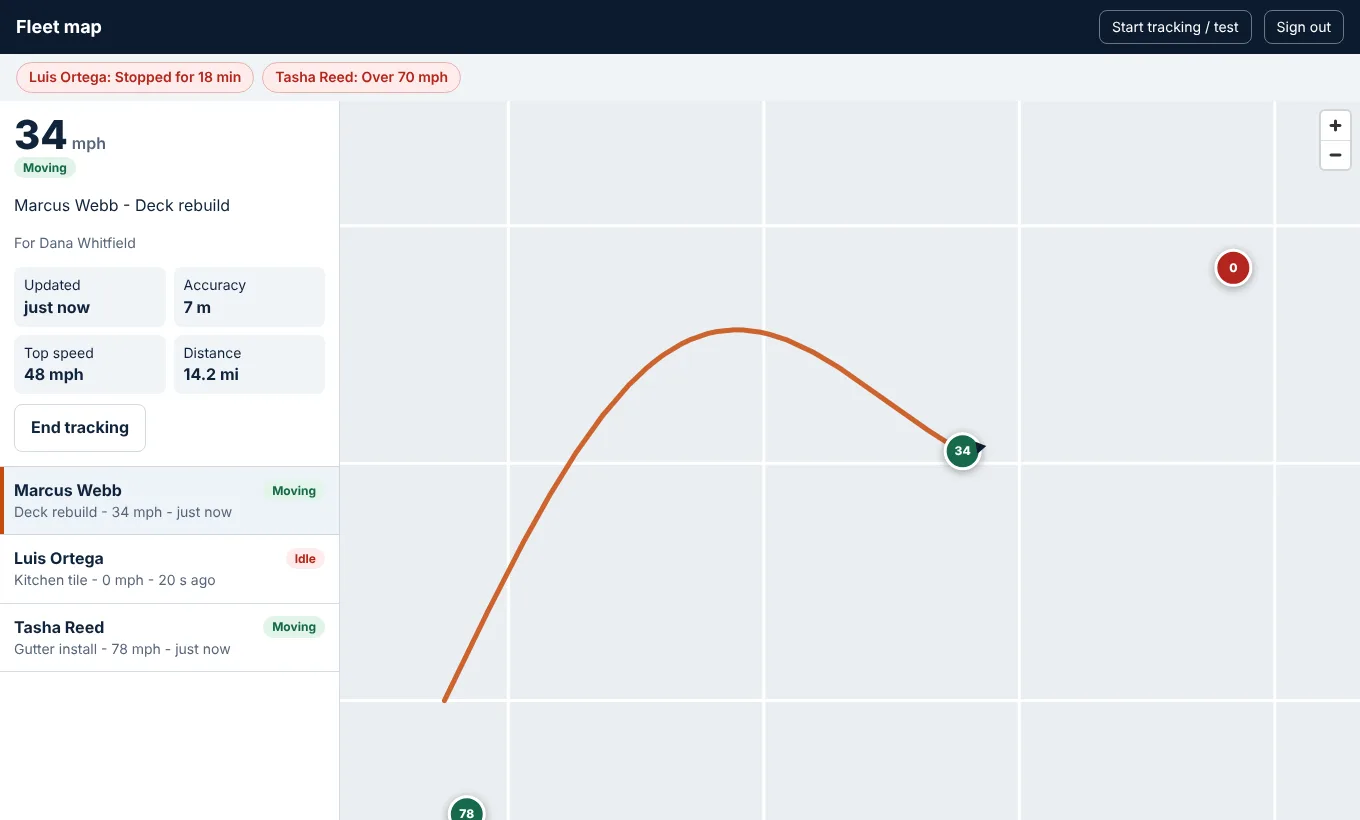
Every tracked worker appears with speed, status, the job and customer, and the route so far.
- 3
It stops with the job
When the job is done, or the worker taps stop, location sharing ends. Nothing is tracked off the clock.
For your crew
Simple on the phone
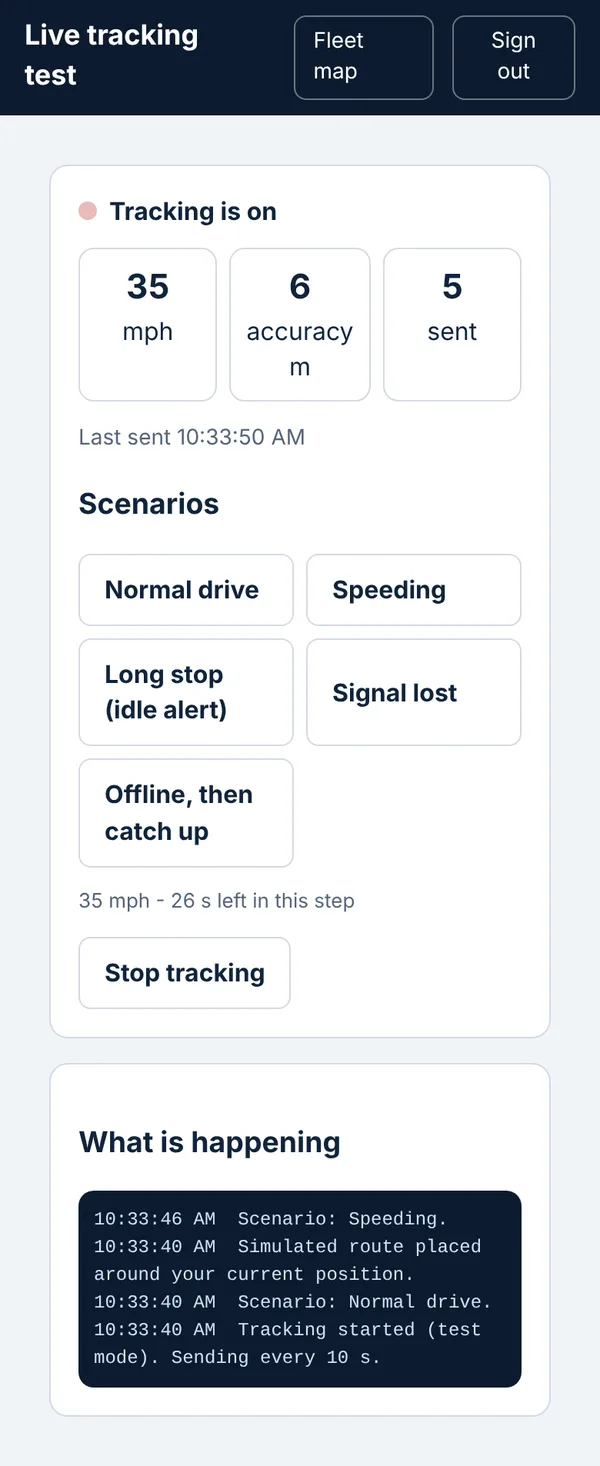
Workers pick the job and tap Start. They can see when tracking is on and stop it themselves.
- One tap to start, one tap to stop
- A visible "tracking is on" indicator
- Points are sent every few seconds and catch up after a lost signal
Your customer
Tell them you are on the way
One tap tells the customer, so they stop calling to ask.
"On my way" message
The worker taps one button and picks about how long. The customer gets an email with a link to their job page.
A live map for them
While the worker is on the way, the customer's job page shows where they are. It disappears when the visit starts. You can turn it off.
Texts, when you want them
Customers can agree to texts on their own job page and reply STOP any time. Texting turns on once it is approved and live.
What you get
Everything you need to stay in the loop
Live location and speed
See each vehicle's position and mph on the map, updated every few seconds.
Status at a glance
Moving, stopped, idle or no signal, with how long since the last update.
Alerts that matter
Speeding, long stops and lost signal show up on the map, so you notice before a customer calls.
Tied to the job
Each trip is linked to the job and customer it was for.
Route trail
See the path a vehicle took, with top speed and distance for the trip.
Your switch
Owners and managers see the map. Workers only share their own location, and only on a job.
Privacy and trust
Built to be fair to your crew
Tracking only works if your team trusts it. So it is designed to be open and limited.
- Only while a job is open. Never off the clock.
- Workers see when tracking is on and can stop it.
- Only owners and managers can see the map.
- Old location points are deleted automatically after the retention period (90 days by default).
- Tell your team what is tracked and why. Rules on tracking employees vary by state, so check yours.
Pricing you can read
Pay per tracked worker
Only workers who actually track in a month are counted. No hardware, no setup fee.
| Plan | Vehicle tracking | Price |
|---|---|---|
| Starter | Not included | - |
| Pro | Add-on you turn on | $10 per tracked worker per month |
| Scale | Included | 3 workers free, then $5 each per month |
Example: a Scale crew with 8 workers tracking pays 5 x $5 = $25 a month for tracking. A Pro crew with 4 pays 4 x $10 = $40. Test drives are free.
Questions
Before you ask
Do my workers need a special device?
No. It runs on the phone they already carry. There is no hardware to buy, install or lose.
Does it track in the background?
Not yet. Today tracking runs from the phone's browser, so the screen needs to stay on while a job is open. Background tracking is planned for the Grover app.
Will it drain the battery?
GPS uses battery, like any navigation app. Because tracking only runs while a job is open, it is limited to work hours.
Can I track someone after hours?
No. Location is shared only while a job is open and the worker has started it.
Can customers see where my worker is?
Yes, when you allow it. A worker taps "On my way" and the customer gets an email with a link to their job page, where a small live map shows the worker until the visit starts. You can turn the map off. The arrival time is the worker's own estimate.
Can customers get a text?
Texting is built but is switched on only once it is approved and live. Customers must agree to texts themselves on their job page, and can reply STOP at any time. Email works today.
What does it cost?
Pro: $10 per tracked worker per month. Scale: 3 tracked workers free, then $5 each. Only workers who track in a month are counted, and test drives are free.
See your crew on the map this week
Start free, then add vehicle tracking when you are ready.